
Find your drink
Search 8,200+ catalog entries or create a custom drink. Save a favorite to reuse its serving, place, and prices next time.
Record a drink, choose the serving, and add the price if you know it.
Check your history and totals whenever you need them.
Real app screens with example entries. Select a screen to see how it works.
The app starts with US fluid ounces. Switch to milliliters anytime in More options → Units. Alcohol totals can use grams, milliliters of pure alcohol, or US standard drinks.
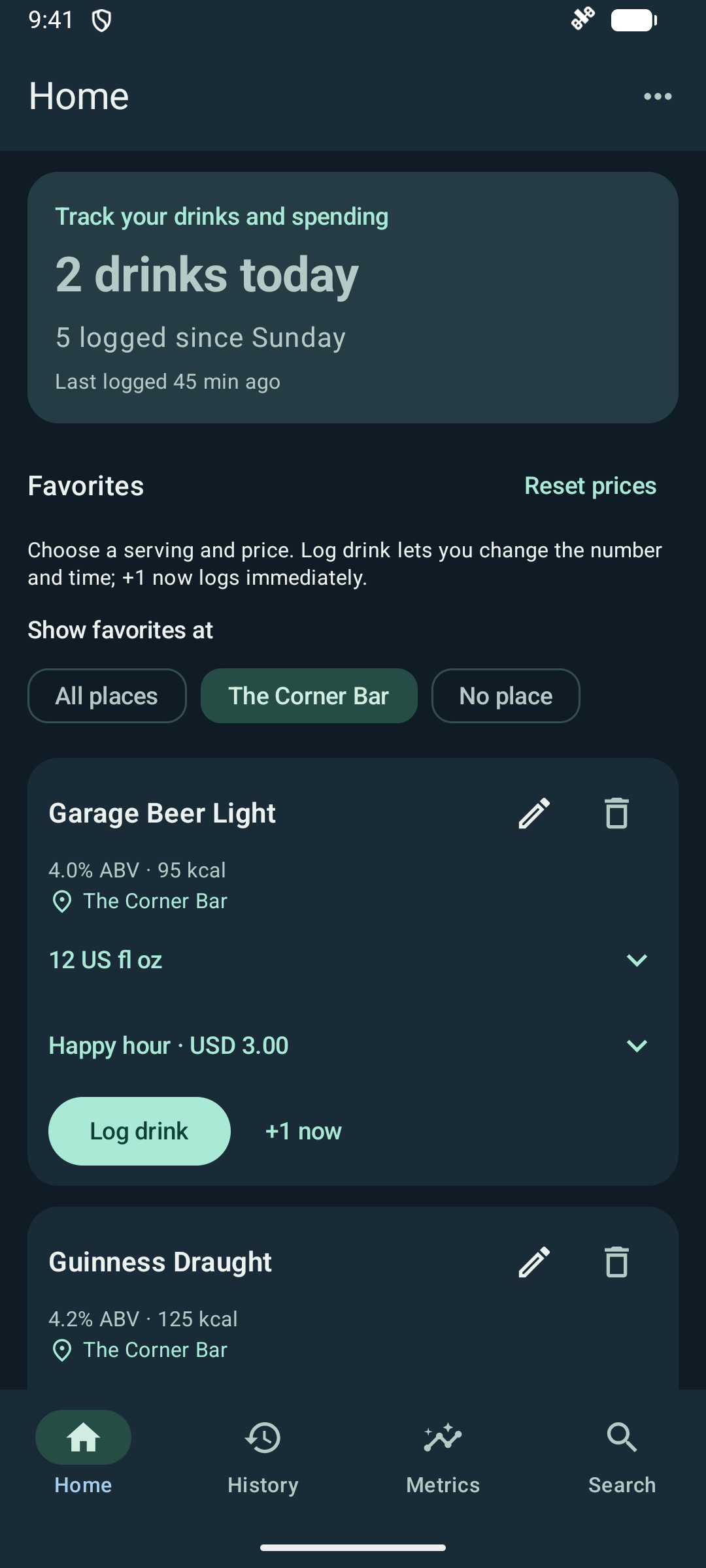
Filter favorites by saved place and choose a serving and price. Tap Log drink to set the quantity and time, or +1 now for an immediate entry. Each log starts with the favorite’s saved place.
Search 8,200+ catalog entries or create a custom drink. Save a favorite to reuse its serving, place, and prices next time.
Use US fluid ounces or milliliters. Enter a price and optional place, or reuse the details saved in a favorite.
Tap Log drink in Search or Favorites. Set the quantity, keep Now or choose an earlier date and time, then save. History also offers Add past drinks.
Save your serving, pub, and any prices you use. Regular price, happy hour, a game-day deal: give each one a name and enter the final amount.
Choose a serving and price on Home. Tap Log drink to change the quantity and time, or +1 now to log immediately. Switch between a 12 and 16 US fl oz pour without editing your favorite. Filter Home by saved place to find your drinks there. Past entries keep the details you actually logged.
See saved favoritesThe Corner Bar · USD per drink
Your labels. Your amounts. Select a price manually in the app. These are fictional examples, not venue offers or automatic discounts.
Name a place when saving or editing a favorite, then reuse it for other drinks. Save it with a favorite for future app and widget logs, and filter Home to your drinks at that place. Your place list works offline and needs no location permission.
Location is optional, and you can change or clear it for an individual app log. Entries without a location still count toward drink and spending totals. Location comparisons show how many entries are tagged.
See how place insights workExport your drink history, custom drinks, favorites, and saved places to a JSON file. Choose where it goes using Android’s file picker.
Moving phones or recovering a saved copy? Preview the file, then choose Restore backup. Missing records are added. Your existing records are kept; untouched starter favorites can be restored from your backup. Restoring the same file again does not duplicate records.
What a backup containsBackups contain readable personal data. Store them somewhere private. There is no automatic PourTally cloud sync; settings, widgets, and ad-removal purchases are separate.
Yes. Every feature is free: logging, spending, insights, saved places, serving preferences, and home-screen widgets. An optional one-time purchase removes banner ads. There is no subscription.
Logging, the drink catalog, saved places, and calculated insights work offline. Optional AI explanations run on your phone once its model is ready. Downloading that model, ads, Google Play purchase checks, and Google AI services' updates, configuration and diagnostics can use internet services.
Yes. US fluid ounces are the default. Open More options → Units to choose milliliters. The preference applies across the app and widgets without changing recorded amounts or nutrition.
Enter the price per drink when you log it, or add it later in History. The price is multiplied by the entry’s drink count. Leave it blank if you don’t know, or enter 0 for a free drink. USD is the default; you can choose another currency. Totals and averages stay separate for each currency, with no exchange-rate conversion. PourTally does not connect to bank accounts or estimate missing prices.
Choose Add custom drink on Search. Enter a serving, ABV, and calories when you know them, or leave those details unknown. Saving makes the drink searchable; choose Log drink to record it, or use Add to favorites separately. The built-in catalog is separate from your custom drinks, favorites, and history. App updates can add or correct catalog entries without rewriting what you previously logged.
Yes. Save named prices to a favorite: Regular, Happy hour, Game day, or your own labels. Enter the final amount for each option, then select the one that applies on Home. That choice is reused for repeat +1 now taps. Prices do not switch automatically with times or game schedules, and discounts do not stack automatically. A widget uses the favorite's saved serving, default price, and place.
Yes. Name a place when saving or editing a favorite, then reuse it for other drinks. Save the same beer at different places with their own servings and prices, and filter Home to a saved place. You can also choose a different serving on Home, such as 12 or 16 US fl oz, without editing the favorite. Saving or editing a favorite does not log a drink or change past entries.
Yes. In Search or Favorites, tap Log drink, set the number of drinks, and choose an earlier date and time instead of Now. History also offers Add past drinks, with favorites first and catalog or custom drinks available through search. For example, record four of the same draft from last night in one entry. Times use your phone’s local time zone and 12- or 24-hour clock setting.
Yes. Tap Log drink in Search or Favorites, then use the plus and minus controls or type a quantity. Keep Now or choose an earlier date and time. The log button shows how many drinks will be added. Calories, alcohol, and spending use that quantity. Favorites also offers +1 now for immediate logging, and History supports quantities for past visits.
Yes. Open More options → Backup & restore to export a JSON backup using Android’s file picker. It includes history, custom drinks, favorites with their prices and places, and your saved places. Choose a backup to preview what will be restored, then select Restore backup. Missing records are added and existing records are kept when IDs match, except that untouched starter favorites can be restored from the backup. Restoring the same file again does not duplicate records. Settings, widgets, the built-in catalog, and ad-removal receipts are not included. Keep the file somewhere private: it contains readable personal data and is not encrypted by PourTally.
Long-press the widget and choose the launcher’s edit or reconfigure option where supported. Otherwise, remove it and add it again to choose its settings. Edit a favorite in PourTally to change the serving, default price, or place used by its quick-log widgets.
Yes. Metrics offers Today, This week, and This month alongside 7 days, 30 days, 90 days, and All time. Choose Sunday or Monday for the start of the week. Counter widgets also offer calendar periods, plus rolling Last 24 hours, Last 7 days, and Last 30 days. Each counter has its own period and week-start choice. Calendar totals use your device’s local time zone.
No. PourTally does not request location permission or use GPS. Places are optional names you enter when saving or editing a favorite and reuse from your own saved list. They work offline.
Published values are distinguished from generic estimates and recipe assumptions. Your actual drink may differ by product, recipe, and pour. Alcohol totals default to grams of pure alcohol. In Units, choose grams, milliliters of pure alcohol, or US standard drinks (14 grams each). These are not blood alcohol or driving-safety calculations.
Cutting back or keeping track. Start with the numbers.